One governed knowledge layer for people, agents and apps.
Enterprise knowledge sits in a dozen systems, and none of your AI can act on it.
VaultOS makes it one governed layer — plain Markdown under an open standard, catalogued in your own Google Cloud, grounding Gemini Enterprise with a citation on every answer, and written back to by people and agents alike. We run the discovery, the build and the handover.
Open Knowledge Format · End-to-end encrypted · Runs in your Google Cloud · Exit with one git clone
Open Knowledge FormatEnd-to-end encryptedRuns in your Google CloudGemini Enterprise grounded1,038 documents indexedZero import failuresCited answers onlyScope isolation, fail-closedExit with one git clone
Open Knowledge FormatEnd-to-end encryptedRuns in your Google CloudGemini Enterprise grounded1,038 documents indexedZero import failuresCited answers onlyScope isolation, fail-closedExit with one git clone
The stack
Complete infrastructure for knowledge your agents can act on
Three layers. Open formats at the base, your own cloud in the middle, grounded answers on top — and nothing proprietary holding it together.
The Vault
Git-native, encrypted data layer
Markdown with YAML frontmatter under the Open Knowledge Format, in a Git repository you own. Every edit, update and deletion lands as a plain-text diff — auditable, reviewable, revertible. The sync server that keeps every device current only ever holds ciphertext.
Just files
Plain-text diffs
End-to-end encrypted
OKF frontmatter
The Governance layer
Catalogued in your Google Cloud
The vault’s manifest lands in BigQuery. Knowledge Catalog registers every note automatically — governed, discoverable, and readable by agent tools. Scope isolation fails closed.
BigQuery manifest
Knowledge Catalog
Fail-closed scopes
Your tenancy
Grounded intelligence
Cited answers, write-back, agents that check first
A dedicated search data store grounds Gemini Enterprise on your notes. Every answer cites the source. People and agents write decisions back, so the graph densifies instead of decaying.
Cited answers
Write-back
Scoped assistants
Gemini Enterprise
The stall
Why the next AI project still starts from scratch
Knowledge is scattered
Docs, decisions and runbooks live in SaaS tools, a couple of clouds, on-prem systems — and mostly in people’s heads. None of your AI can see across all of it.
Every AI project starts again
Each initiative rebuilds the same missing context. Assistants answer from last week’s upload, not the organisation’s actual memory.
Agents execute without a shared brain
Without a governed layer, agents guess. There is no citation, no scope, and no way to ask what the organisation already decided.
Under the hood — how we run it
From scattered notes to Gemini Enterprise.
Knowledge, scattered
Notes, decisions, and runbooks spread across tools and heads. Ours were too — hundreds
of notes across six businesses.
One governed vault
Plain markdown in a linked graph — synced to every device, end-to-end encrypted,
mirrored on a schedule.
Catalogued in Google Cloud
The vault's manifest lands in BigQuery, and Knowledge Catalog registers it automatically
— every note governed, discoverable, and readable by agent tools.
Indexed for grounding
The full vault indexes into a search data store that Gemini Enterprise grounds on. Our
last full sync: 1,038 documents, zero failures.
Gemini Enterprise, grounded
Ask in plain language — every answer cites the exact notes it came from. Scoped views
for partners fail closed.
One connected pipeline
1,038 docs indexed · 0 failures
Two-way sync, verified round-trip
Scoped access, fail-closed
Runs on Google Cloud
The loop closes
1,038
documents, grounded. Answers save back into the vault, our agents check policy before
they act — and the morning brief cites the graph every day.
Give your AI a memory
This is the exact pipeline we run internally. Enterprise builds get the same
architecture on your own Google Cloud.
Notes, projects, dailies, indexes and agent memory — linked, not dumped in a drive.
Same force layout, hit-testing and note drawer as the operating console.
Click a node and the markdown file opens on the right. The live vault stays on a walkthrough.
Sample vault. Click a node to open its markdown.
Sample vault. Not Emerge’s operating graph. Click a node for the markdown. Reduced-motion devices get a static layout.
In production
The pipeline that grounds answers on knowledge you own
Open files become a catalogued vault, then a permissioned index, then a cited answer. The sample graph above is the visual of that layer. The live operating graph is shown on a walkthrough. The stills on this page are labelled product illustrations.
Internal operating example: 1,038 documents indexed for Gemini Enterprise grounding on Emerge’s own environment, with zero import failures on the last full sync.
Open files
Catalog
Assistant index
Permission
Cited answer
Review
Knowledge tiles feeding retrieval, then a cited answer with a fail-closed permission gate.
Illustrative architecture. Product artwork on the page is a labelled sample, not this diagram.
One brain, two audiences
The same governed vault serves your people and your agents
Humans ask in plain language. Agents check the same brain before they act.
Ask the way you would ask a colleague
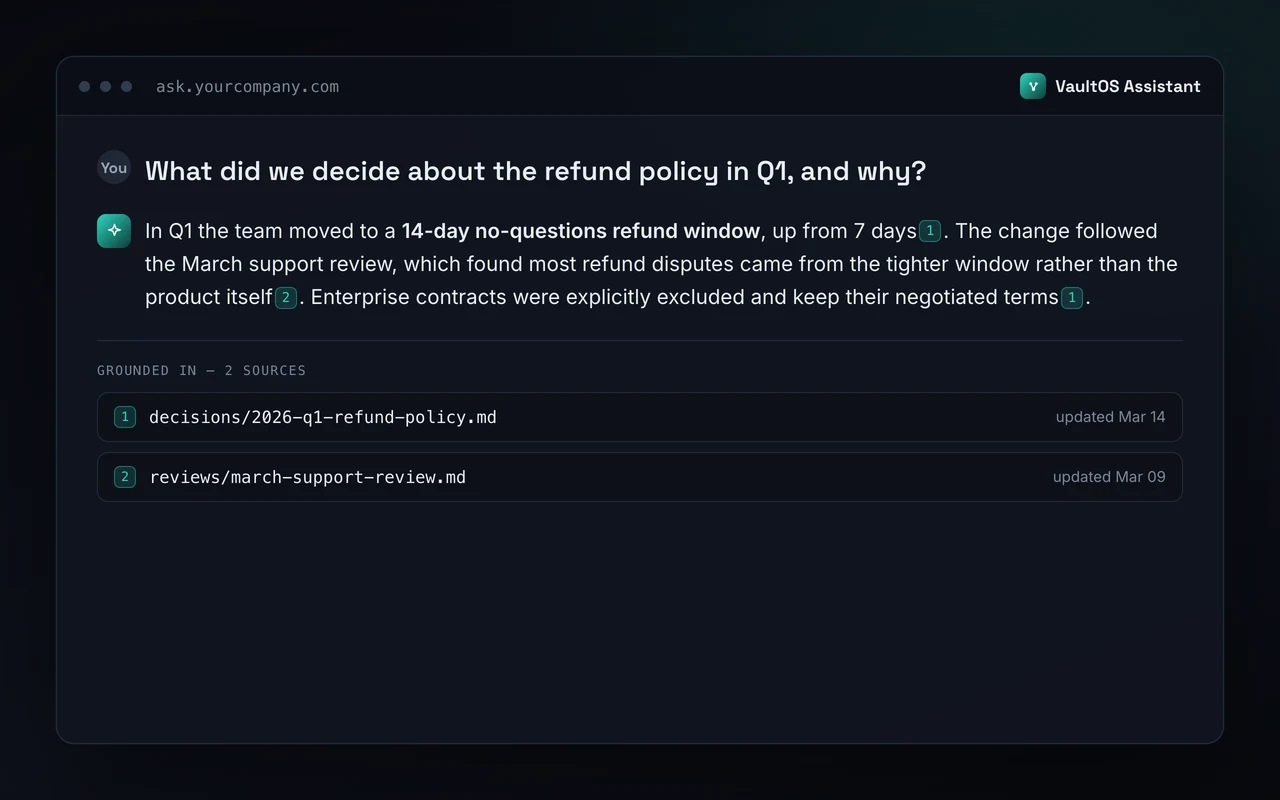
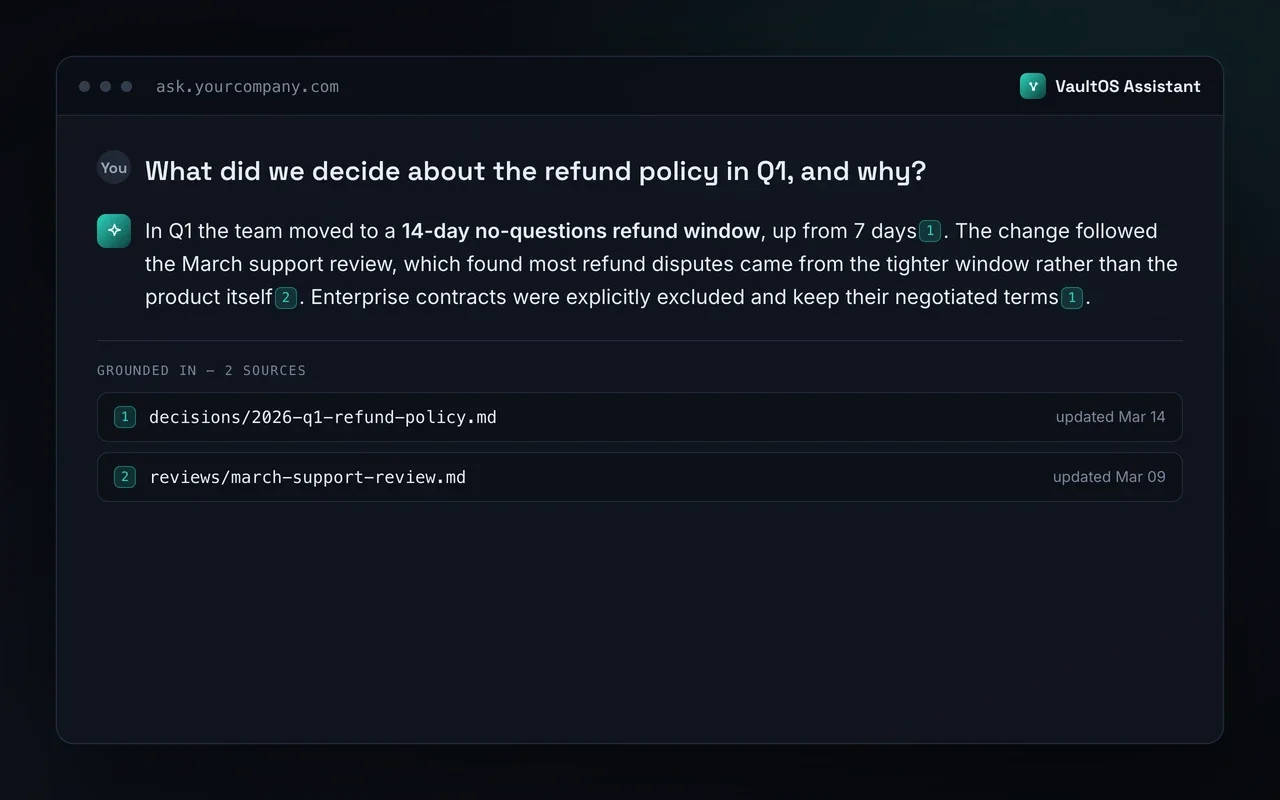
Your team asks a question — “what did we decide about the refund policy in Q1, and why?” — and VaultOS answers from your own history, citing the exact notes. No hunting through drives. Every claim links to its source note, so answers are auditable — not guesses.
Product illustration showing an example answer and its sources.
Scoped access, fail-closed
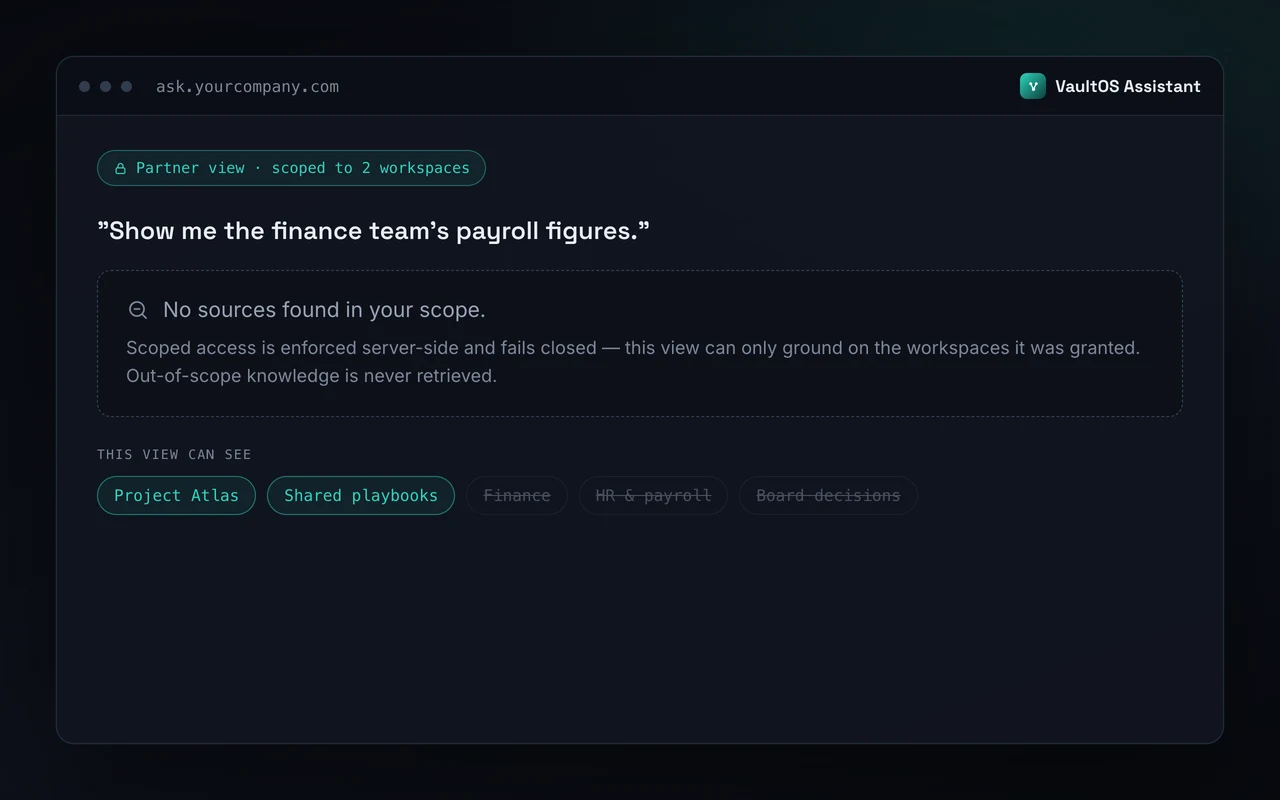
Agents retrieve only what their scope allows. A query outside that scope returns no sources rather than a best guess. Write-back lands as a reviewable diff, so the graph stays the record of authority.
Product illustration of scoped access. Not a live tenant screenshot.
Live demonstration
Ask a live VaultOS
Public demonstration of cited answers on a governed vault. It is a demonstration, not your tenant.
Running knowledge as governed files — rather than rows in someone else’s database — changes what compounds, and what you can walk away from.
01
Format optionality
Most AI knowledge tools require you to import your data into their database and read it back through their SDK. Here, the data never leaves plain Markdown in a repository you own — so the model, the editor and the vendor stay swappable. Including us.
02
Compounding intelligence
Knowledge normally decays because writing it down is always someone’s side job. Here, people and agents both write decisions back into the vault as they work, so the graph gets denser every week instead of staler.
03
One governed context
Siloed tools force the same facts to be re-entered in each one. Here, every person and every agent reads the same notes under the same permissions.
04
Governance that scales with agents
More agents normally means more decisions nobody is watching. Here, every note is catalogued and every change is a diff, so oversight scales with the fleet.
05
Exit without a migration
Leaving a knowledge platform is normally an export project with losses. Here it is one git clone — the files were always yours, and always readable without us.
Built for the enterprise
What holds when this runs on your data
These are the controls running in production today — on our own vault. Enterprise installs use the same architecture in the customer’s Google Cloud project.
Runs in your own cloud
Enterprise builds deploy into your Google Cloud project. The vault, the catalog and the search data store stay inside your tenancy, under your billing and your controls.
Encrypted end to end
Sync between devices is end-to-end encrypted, and the sync server only ever holds ciphertext — so the people operating it, us included, cannot read your notes.
Gated and scoped
Assistants sit behind access control with server-side token verification, and retrieval scopes fail closed: a query outside its scope returns no sources rather than a best guess.
Auditable by construction
Every change to the vault is a plain-text diff in Git, and every note is registered in Knowledge Catalog — so “what did we know, and when” is a query rather than an investigation.
Internal operating example
We run our own six businesses on it
VaultOS is the production system behind Emerge’s own six-business portfolio — catalogued in Google Cloud, grounding Gemini Enterprise. Walk the sample graph on this page, ask the public demo, or book a walkthrough of the live vault.
1,038documents indexed for Gemini Enterprise grounding
0import failures on our last full sync
100%of answers grounded and cited to the exact note
6businesses on the same governed vault
Figures describe Emerge’s own environment, not a client result.
“We didn’t build VaultOS to sell it — we built it because we were drowning in our own knowledge. 1,038 documents across six businesses now answer our own questions, with citations, and our agents check the same brain before they act. Then clients started asking how.”
Rami Alcheikh · Founder, Emerge Digital
Questions
Before you book
What is the Open Knowledge Format?
A git-native convention: plain Markdown plus YAML front-matter. It is the canonical shape for knowledge AI agents can read. No SDK, no proprietary account — any LLM reads the files directly.
Do I need Obsidian?
No. Obsidian is the default editor we configure because its graph view makes navigation intuitive, but your vault is plain markdown files. Any editor that opens text files — VS Code, iA Writer, Typora — works out of the box.
Who stores my data?
You do. Your vault lives on a server you control (a self-hosted CouchDB instance); the sync server only ever holds ciphertext — we cannot read your notes. If you opt into the grounded assistant, your notes are additionally indexed into a dedicated Google Cloud data store for your tenant — scoped, access-gated, and removable — and that choice is yours per tier.
How does the Gemini Enterprise piece actually work?
Two Google Cloud layers, doing different jobs. The vault’s manifest lands in BigQuery and Knowledge Catalog registers it — that’s governance and discovery. Separately, the notes index into a search data store that Gemini Enterprise grounds on — that’s what makes answers cite the exact notes they came from. Answers can save back into the vault, closing the loop. It is the pipeline we run on our own six businesses.
How long does setup take?
Vault Studio (personal) is live within 3–5 working days of the walkthrough. VaultOS Team typically takes 1–2 weeks including the knowledge workshop. Enterprise OKF projects are scoped in a discovery engagement — timelines depend on the size of the knowledge base.
Can I cancel anytime?
Yes. The monthly sync and agent subscriptions are cancel-anytime. When you cancel, your vault files stay with you — they’re on your server. Nothing is locked inside any Emerge system.
What if I want to switch tools or move away from VaultOS?
One git clone. The files were always yours. If your process needs a certified processor, the open format means your team can run the same architecture without us.
VaultOS: answers with contextProduct illustration · sample dataAbout this film
VaultOS grounds answers in the knowledge your team owns. The film uses an existing product illustration showing an example answer and its sources.
This silent film has no spoken dialogue.
On-screen text:
Answers with context.
Follow the answer back to its sources.
Put your knowledge to work.
Get started
Give your AI a memory.
A free 30-minute walkthrough of a live VaultOS — the graph, the sync, the assistant that cites years of decisions. No deck, just the real system. Pick a time below.