
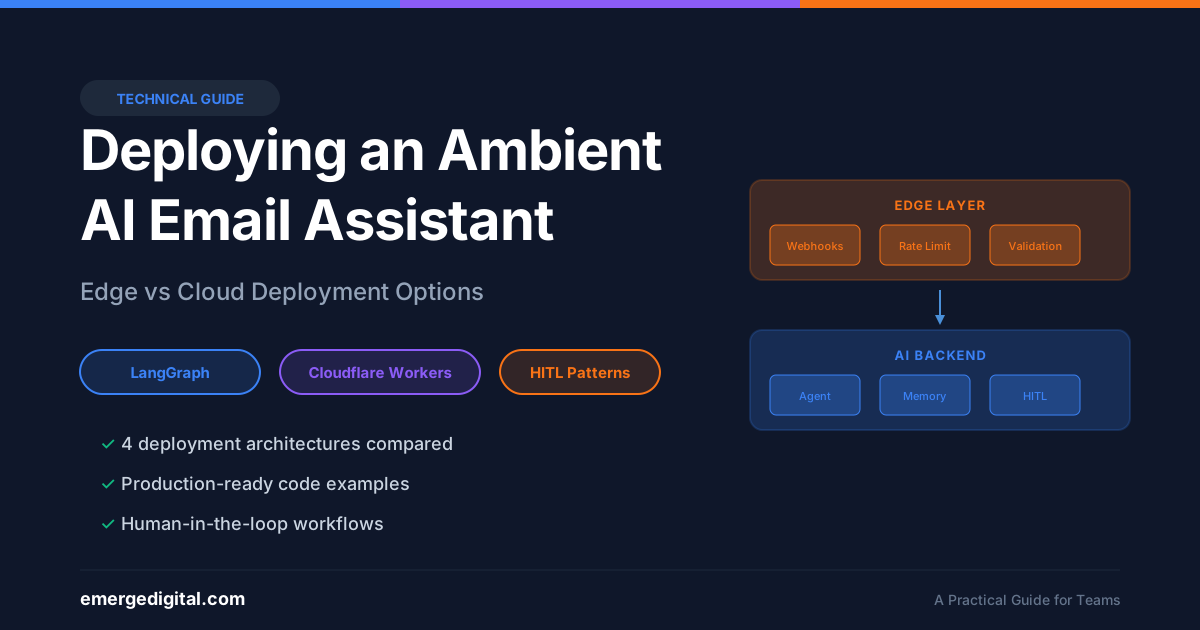
Deploying an Ambient AI Email Assistant
A Practical Guide for Teams Considering Edge and Cloud Deployment
Overview
This guide covers deployment options for ambient AI agents, specifically focusing on the LangChain/LangGraph email assistant architecture. We’ll address the common question: “Can I deploy this on Cloudflare Workers?”
Short answer: Not directly. LangGraph requires stateful infrastructure that Cloudflare Workers doesn’t provide. However, there are hybrid approaches and alternatives worth considering.
Understanding the Architecture
What Makes Ambient Agents Different
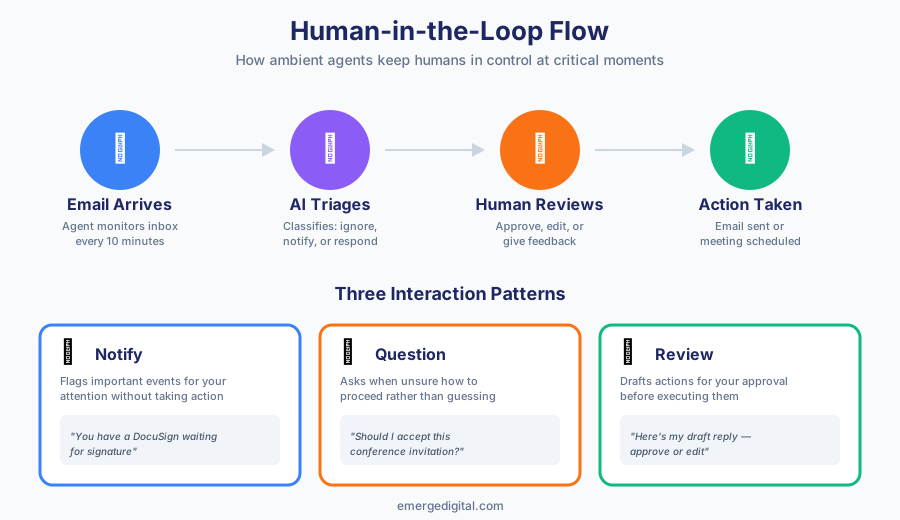
Ambient agents aren’t simple request-response APIs. They require:
- Persistent State – Agents maintain conversation history, memory, and workflow state
- Scheduled Execution – Cron jobs to check for new emails (e.g., every 10 minutes)
- Long-Running Processes – Complex workflows that may take minutes to complete
- Human-in-the-Loop Checkpoints – Ability to pause and wait for human input
The LangGraph Email Assistant Components
Based on LangChain’s Executive AI Assistant (EAIA):
| Component | Purpose |
|---|---|
| Email Triage | Classifies emails: ignore, notify, or respond |
| Draft Response | Generates email drafts for review |
| Calendar Integration | Checks availability, schedules meetings |
| Memory Store | Learns from user feedback over time |
| Agent Inbox UI | Human-in-the-loop review interface |
Deployment Options
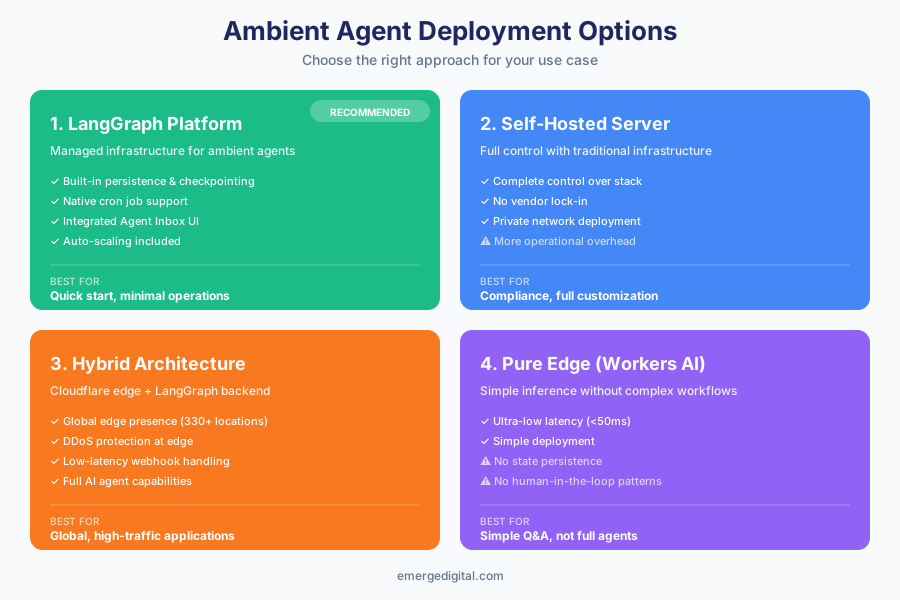
Option 1: LangGraph Platform (Recommended)
The simplest path to production. LangChain provides managed infrastructure specifically designed for ambient agents.
Setup Steps:
- Fork the EAIA repository
- Create a LangSmith Plus account
- Deploy via LangSmith dashboard
- Configure environment variables (API keys)
- Set up the cron job for email polling
Advantages:
- Built-in persistence and checkpointing
- Native cron job support
- Integrated with Agent Inbox UI
- Handles scaling automatically
Cost: Requires LangSmith Plus subscription
Option 2: Self-Hosted (Traditional Server)
For teams wanting full control or with specific compliance requirements.
Infrastructure Required:
- Compute: Any cloud VM (AWS EC2, GCP Compute, Azure VM, DigitalOcean Droplet)
- Database: PostgreSQL for state persistence
- Redis: For caching and task queuing (optional)
- Scheduler: systemd timer, cron, or Celery beat
Basic Setup:
# Clone the repository
git clone https://github.com/langchain-ai/executive-ai-assistant
cd executive-ai-assistant

# Create virtual environment
python -m venv venv
source venv/bin/activate
pip install -e .

# Configure
cp eaia/main/config.yaml.example eaia/main/config.yaml
# Edit config with your details

# Set up Google OAuth
python scripts/setup_gmail.py

# Run the development server
pip install -U "langgraph-cli[inmem]"
langgraph dev

# Set up cron for production
crontab -e
# Add: */10 * * * * /path/to/venv/bin/python /path/to/scripts/run_ingest.py --minutes-since 15
Advantages:
- Full control over infrastructure
- No vendor lock-in
- Can be deployed in private networks
Challenges:
- Must manage uptime, scaling, backups
- More operational overhead
Option 3: Hybrid Architecture with Cloudflare Workers
Why Direct LangGraph on Workers Doesn’t Work:
Cloudflare Workers limitations:
- 128 MB memory limit
- Short execution windows (CPU time limits)
- No persistent state between invocations
- V8 isolate restrictions (JavaScript/TypeScript/WASM only)
LangGraph requirements:
- Persistent state for conversation history
- Long-running workflows (can take minutes)
- Complex memory and checkpointing
Hybrid Approach:
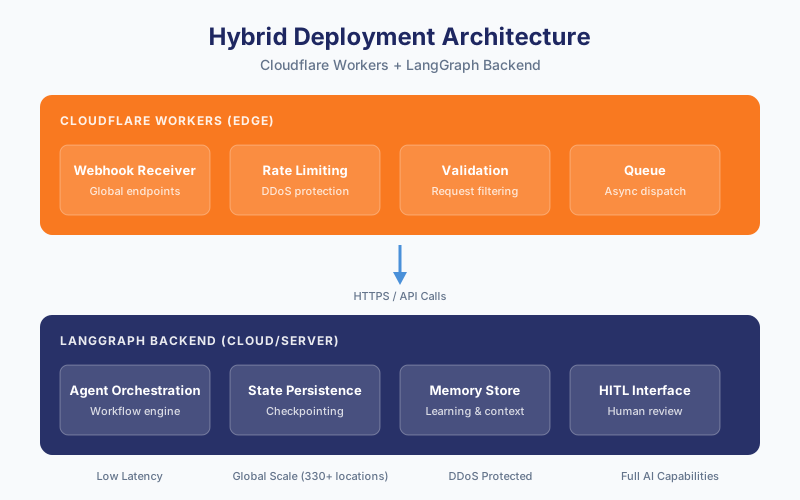
Use Cloudflare Workers for lightweight, edge-native tasks while keeping the core agent on traditional infrastructure.
Cloudflare Worker Code Example (Webhook Handler):
// wrangler.toml
// name = "email-agent-gateway"
// main = "src/index.ts"

export interface Env {
  LANGGRAPH_API_URL: string;
  LANGGRAPH_API_KEY: string;
}

export default {
  async fetch(request: Request, env: Env): Promise {
    const url = new URL(request.url);

    // Validate incoming webhook
    if (request.method !== 'POST') {
      return new Response('Method not allowed', { status: 405 });
    }

    // Rate limiting (using Workers KV or Durable Objects)
    // ... rate limit logic here ...

    // Forward to LangGraph backend
    const payload = await request.json();

    const response = await fetch(`${env.LANGGRAPH_API_URL}/runs`, {
      method: 'POST',
      headers: {
        'Content-Type': 'application/json',
        'Authorization': `Bearer ${env.LANGGRAPH_API_KEY}`,
      },
      body: JSON.stringify({
        assistant_id: 'main',
        input: payload,
        config: { configurable: { thread_id: payload.thread_id } },
      }),
    });

    return new Response(JSON.stringify({ status: 'queued' }), {
      headers: { 'Content-Type': 'application/json' },
    });
  },
};
When to Use This Pattern:
- You need global edge presence for webhooks
- DDoS protection and rate limiting at the edge
- Low-latency request validation before hitting your backend
- Geographic distribution for initial request handling
Option 4: Alternative Edge-Native Approaches
If you specifically need edge-native deployment, consider these alternatives to LangGraph:
1. Cloudflare Workers AI (Simple Inference)
For simple, stateless LLM inference at the edge (not full agent workflows):
// Cloudflare Worker with Workers AI
export default {
  async fetch(request: Request, env: Env): Promise {
    const { messages } = await request.json();

    const response = await env.AI.run('@cf/meta/llama-3.1-8b-instruct', {
      messages,
    });

    return new Response(JSON.stringify(response));
  },
};
Limitations: No persistence, no complex workflows, no human-in-the-loop. Suitable for simple Q&A but not for ambient agent patterns.
2. Cloudflare Durable Objects + Workers AI
For simple stateful agents:
export class EmailAgentDO {
  state: DurableObjectState;

  constructor(state: DurableObjectState) {
    this.state = state;
  }

  async fetch(request: Request): Promise {
    // Persistent state within the Durable Object
    const history: string[] = await this.state.storage.get('history') || [];
    const { message } = await request.json() as { message: string };

    // Process with AI (simplified example)
    const aiResponse = await this.processMessage(message);

    // Save state
    await this.state.storage.put('history', [...history, message, aiResponse]);

    return new Response(JSON.stringify({ response: aiResponse }));
  }

  async processMessage(message: string): Promise {
    // Your AI logic here
    return `Processed: ${message}`;
  }
}
Limitations: Still constrained by execution time limits, no built-in HITL patterns
Configuration Guide
Required Environment Variables
# LLM API Keys
OPENAI_API_KEY=sk-...
ANTHROPIC_API_KEY=sk-ant-...

# Google OAuth (for Gmail access)
GOOGLE_CLIENT_ID=...
GOOGLE_CLIENT_SECRET=...

# LangSmith (for observability)
LANGCHAIN_API_KEY=...
LANGCHAIN_TRACING_V2=true
LANGCHAIN_PROJECT=email-assistant

# For hybrid Cloudflare setup
LANGGRAPH_API_URL=https://your-deployment.langchain.app
LANGGRAPH_API_KEY=...
Email Assistant Configuration
Create eaia/main/config.yaml:
email: [email protected]
full_name: Your Full Name
name: FirstName
background: |
  Senior Product Manager at TechCorp.
  Focus areas: AI products, enterprise solutions.
timezone: America/New_York

schedule_preferences: |
  - Default meeting length: 30 minutes
  - Prefer afternoon meetings
  - No meetings before 9am or after 6pm

response_preferences: |
  - Include calendar link for scheduling requests
  - CC assistant on important threads

triage_no: |
  - Marketing newsletters
  - Automated notifications
  - Out of office replies

triage_notify: |
  - Legal documents requiring signature
  - Messages from executives

triage_email: |
  - Direct questions requiring response
  - Meeting requests
  - Project updates needing acknowledgment
Connecting to Agent Inbox
The Agent Inbox provides the human-in-the-loop interface for reviewing agent actions.
Setup:
- Go to agentinbox.ai
- Log in with Google
- Click Settings → Add Inbox
- Configure:
- Assistant/Graph ID:
main - Deployment URL: Your LangGraph deployment URL
- Name: Production Email Assistant
- Assistant/Graph ID:
Interrupt Types:
| Type | Description | Actions |
|---|---|---|
| Notify | Flags important emails | Ignore, Mark Resolved, Respond |
| Question | Agent needs clarification | Respond, Ignore |
| ResponseEmailDraft | Draft ready for review | Edit/Accept, Respond, Ignore |
| Schedule | Meeting invite ready | Edit/Accept, Respond, Ignore |
Production Checklist
Before Go-Live
- [ ] OAuth tokens refreshing correctly
- [ ] Cron job running reliably (monitor for failures)
- [ ] Error alerting configured (Slack, email, PagerDuty)
- [ ] Rate limits in place for API calls
- [ ] Memory/storage limits understood and monitored
- [ ] Human review process documented for team
- [ ] Rollback plan documented
Monitoring
# Example: Log agent actions for monitoring
from datetime import datetime, timedelta
from langsmith import Client

client = Client()

# Get runs for your project
runs = client.list_runs(
    project_name="email-assistant",
    execution_order=1,
    start_time=datetime.now() - timedelta(hours=24)
)

# Check for errors
errors = [r for r in runs if r.error]
if errors:
    # Replace with your alerting mechanism (Slack, email, PagerDuty, etc.)
    print(f"ALERT: Found {len(errors)} agent errors in last 24h")
Summary
| Deployment Option | Best For | Cloudflare Involvement |
|---|---|---|
| LangGraph Platform | Quick start, managed | None (or edge gateway) |
| Self-Hosted | Full control, compliance | Optional edge gateway |
| Hybrid | Global presence + AI backend | Edge webhooks + rate limiting |
| Pure Edge (Workers AI) | Simple, stateless inference | Full (but limited AI capabilities) |
Recommendation: Start with LangGraph Platform for fastest time-to-value. Consider hybrid architecture only if you need edge-specific capabilities like global webhook handling or DDoS protection.
Resources
- LangChain Executive AI Assistant
- LangGraph Documentation
- Agent Inbox
- Cloudflare Workers AI
- LangChain + Cloudflare Integration
Guide prepared by Emerge Digital